
Project checks and repairs#
The Utils drawer's General tab: the health check of the .hip itself and
the repairs for what it finds. It is the tab the drawer opens on, and the only one
useful without a source project picked. It works on the one project whose card you
pressed Utils on — copying a node's setup between projects is the drawer's
other half, The Utils drawer.
The General tab#
Every check is one row — its name, the verdict, the value beneath — and the fixes sit in the footer, in the order they have to be run.
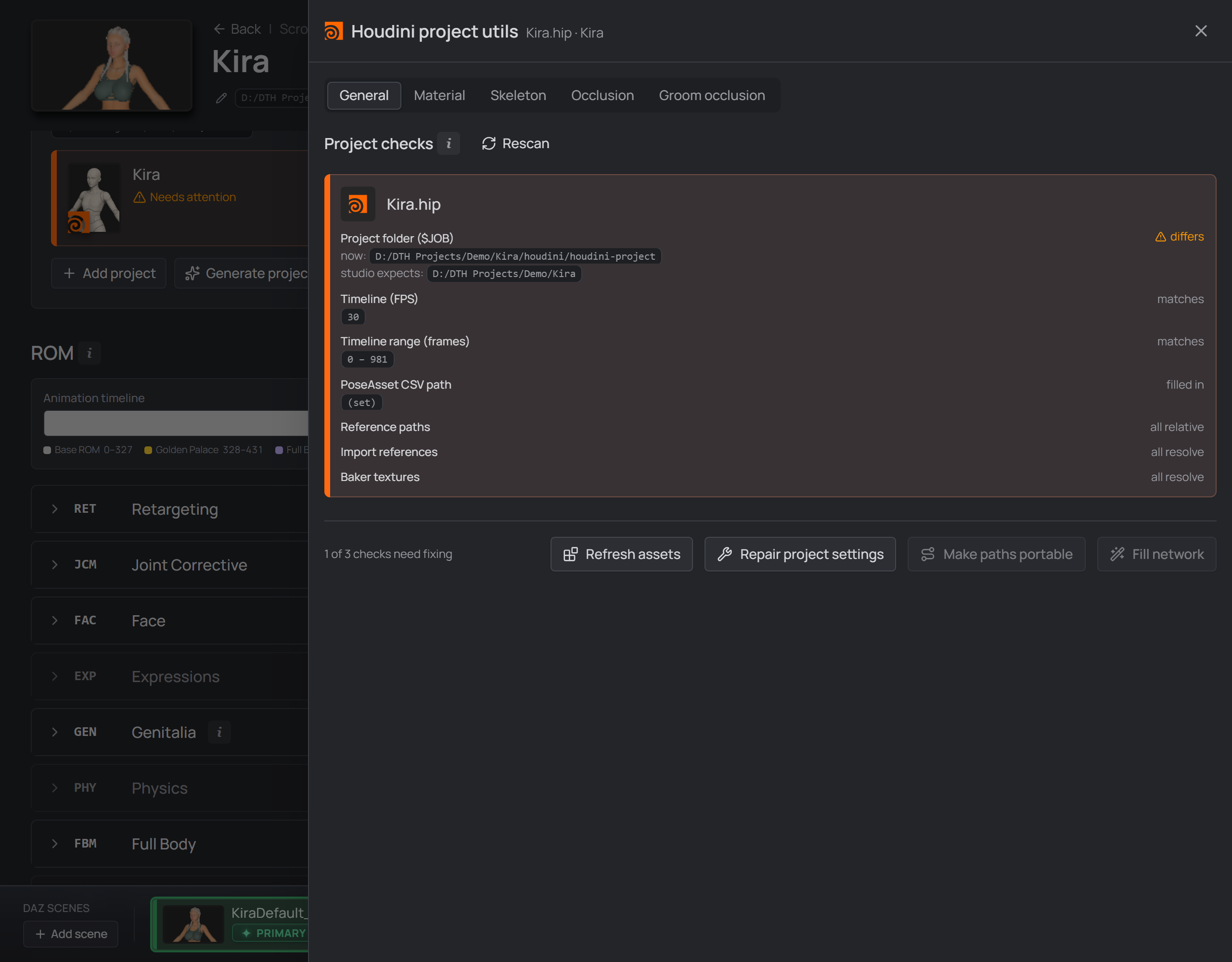
A project made before v0.64: $JOB still points below the exports, everything else passes.
| Row | What it tells you | Fixed by |
|---|---|---|
Project folder ($JOB) |
$JOB is saved inside each .hip, so a project keeps whatever it was created with. It is what reaches the character's export/ folder, so a project carrying another character's $JOB aims its finals at that character's tree. |
Repair project settings |
| Timeline (FPS) | The ROM is one pose per frame at 30 fps, the rate the CSV's frame numbers mean; Houdini's default is 24. DazToHue's import node sets this when it loads files, so this row is about projects where that never happened. | Repair project settings |
| Timeline (range) | The playbar next to what the project's own Alembic says it should be. A scene left on Houdini's default 1–240 over a longer ROM puts part of it outside the timeline. | Repair project settings |
| PoseAsset CSV path | A read-out: filled in, not filled in, or your DazToHue has no such parameter. | Fill network |
| Reference paths / Import references | What is already written down, and whether it resolves. | Make paths portable |
| Baker textures | Material baker layer textures whose file is no longer on disk. When the same file exists in your Daz library (a moved library, a path from another machine), Make paths portable repoints it; otherwise putting the file back is a reinstall — and when your DIM manifests list the file, the row names the product (and SKU) to reinstall. | Make paths portable |
Why baker textures are worth a row at all. This is the one failure in the pipeline that reports itself as success: baking with a missing texture prints
DazToHue: export finishedand raises nothing. Without this row the first sign is a wrong-looking character in Unreal, long after the bake.
Repair project settings#
Writes $JOB (to the character folder) and the timeline. Repointing $JOB fixes
what you pick from now on — measured with the call Houdini's own file picker
uses:
$JOB |
picking an export gave you |
|---|---|
<character>/houdini/houdini-project |
D:\…\Ita\houdini\daz-export\primary\Ita.fbx |
<character> — what this button writes |
$JOB/houdini/daz-export/primary/Ita.fbx |
It does not rewrite references already stored absolute — that is Make paths
portable. The button is enabled only when the project actually differs, and the
two values are judged separately, so a project whose $JOB is fine and whose
timeline is 24 gets its timeline written and nothing else. A value the scan
couldn't read is never repaired: it is unknown, not wrong.
What
setFpsdoes to existing animation is Houdini's business. The repair calls Houdini's ownsetFps; how that treats keys already in a scene is Houdini behaviour this studio has not measured. The project is backed up first either way.
Make paths portable#
Four things in one pass:
- Rewrites absolute references under
$HIP,$JOBor$DAZ3D_LIBso they are stored relative to that variable — on a real project, 131 texture paths. Anything under none of those roots stays as it is and the report names it. - Re-homes the older
$HIP/../…paths the card warns about. They resolve today but encode the scene's depth, so the day that.hipsits one folder deeper every one of them points somewhere else. A$HIPpath that stays inside the folder is where Houdini puts renders and caches, and is left alone. - Rebuilds a DazToHue import path pointing at a file that isn't there — from that node's surviving export files, otherwise from the character's current export directory. The new path is only written when the file it would point at actually exists. Nothing is guessed.
- Repoints paths under another Daz library root (a moved library, a
.hipfrom another machine) at yours, as$DAZ3D_LIB/…— only when the same library-relative file exists there, and the report names each old → new pair.
$JOBhas to be right first, and the button stays disabled until it is. Measured on one real project: with the stale$JOBit reports 0 paths it can fix; after the$JOBrepair, the same file reports 2.
Both repairs offer a Dry run and both take the same silent backup, so a failed run can be undone from its own report. Running twice changes nothing the second time.
Fill network#
Gives an existing project the wiring Generate project gives a new one: import file paths, export directory and — once your DazToHue has it — the PoseAsset CSV path. Two things make it safe on a project you set up by hand:
- Only blank parameters are written; anything you filled in is listed as already set, left alone.
- A parameter your DazToHue version doesn't have is named, not silently skipped. DazToHue 2.5 has no PoseAsset CSV path (the node ships an import button), so the row says so; 2.5.1 added it (Auto CSV File Path) and Fill network writes it like any other blank parameter.
Once the paths are in it runs the import node's own "a character was chosen" routine, so the project comes back with the character loaded, on the rest pose. Skipped when the export files aren't on disk yet.
Refresh assets#
A .hip stores the DazToHue asset definitions it was built with, so switching your
installed DazToHue release leaves every existing project on the old ones. This
button runs DazToHue's own Refresh Assets shelf tool on this project without
you opening Houdini. Three things it can't do:
- It isn't a check. Nothing in a project says which DazToHue release its assets came from. Run it when you know you changed DazToHue.
- It can't preview. The Dry run still opens the project and runs the tool — it just never saves the file, which is a weaker promise than the other dry runs.
- It won't tell you it worked. The report names the tool that ran and whether the scene came back modified — nothing more was observed.
If the tool isn't found, the report names the DazToHue shelf tools that were there — usually the fastest way to see that DazToHue isn't installed for the Houdini version the studio is pointed at.
Scanning#
Like Generate project,
this runs Houdini's hython, so it needs the Houdini installation folder and its
matching documents folder in Settings. The drawer scans the one project it was
opened on — when it opens, and again after a run — and only when something that
project depends on changed. One scan serves every tab.
Installing a new DazToHue invalidates it, since what the scan remembers depends
on the libraries hython loads, not only on the .hip. Rescan bypasses the cache
and re-opens the .hip, so a verdict you believe is wrong has a way out.